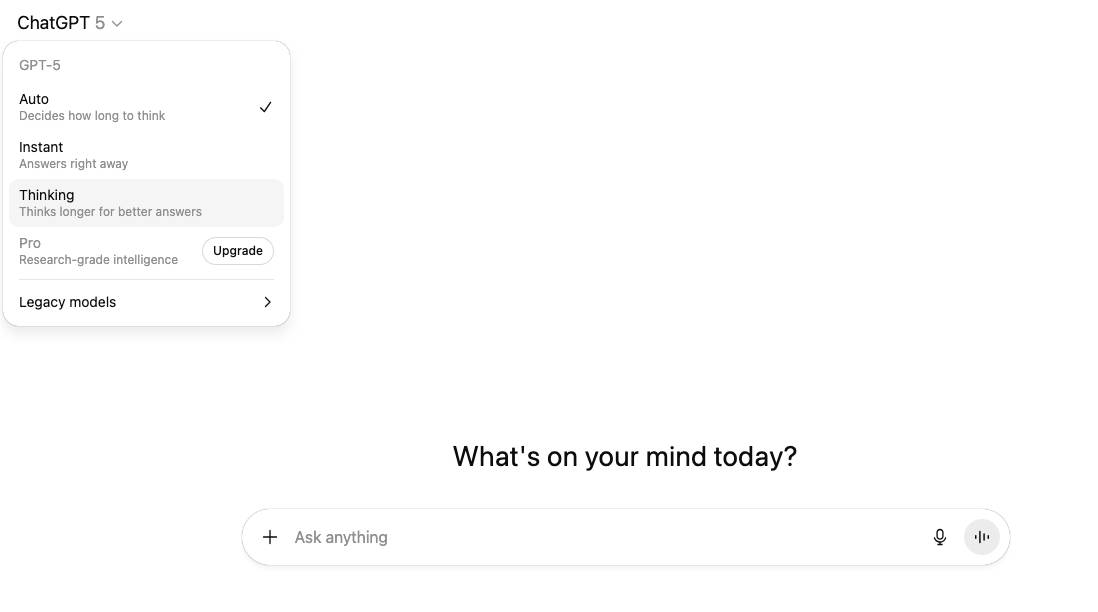
1 – Try the ChatGPT “Thinking” mode
If you’re using ChatGPT 5, click on the little arrow beside “ChatGPT 5” and select “Thinking” mode. Billed as “Thinks Longer for better answers” this is the simple way to get a better answer. But wait, there’s more. Much more.
2 – Ask ChatGPT to think longer.
If by “think longer” you mean give longer, more detailed reasoning/explanations, you can signal that directly. Use prompts like: “Explain your reasoning step by step,” “Think through this as carefully as possible,” or “Take your time and consider multiple angles.” This encourages the model to expand its internal reasoning into the output. You might want the model to explore multiple possibilities instead of jumping to one answer. Just use a prompt like: “Give me at least three possible explanations,” “List pros and cons,” or “Brainstorm alternatives.”
3 – ChatGPT “Think Longer” Meta-prompt
I want you to think in multiple passes before answering.
- First, brainstorm a wide set of possibilities (at least 5).
- Then, analyze and compare them, listing pros/cons or trade-offs.
- After that, draft a structured answer (organized, not polished yet).
- Next, revise and polish that draft into a final, clear, and well-written response.
- Finally, summarize the key takeaways at the end in 3 bullet points.
Do not skip any step — show your thinking as you go.
4 – Get ChatGPT to think longer using conversations
Have you missed the point of a chat-interface? Try a back and forth conversation where you ask more questions and it drills down into the detail.
Each turn builds more context, and by the time you ask for a summary, the model has essentially “thought out loud” across multiple passes.
This is actually the most natural way to stretch out thinking, instead of trying to “hack it”.
5 – Use “deep research” in ChatGPT
To do this click on the “+” sign in the chat window and select deep research. This mode triggers slower, more exhaustive reasoning, often checking against external sources.
If the other options aren’t working then this one is like forcing the model into “academic mode.” It will produce an exhaustive answer.
Use this if you a wide-option question in a field you’re not familiar with. Often it will ask you some missing questions before embarking on several web searches and a thoughtful answer. Beware if you’re not on a paid plan, your use of this feature can be limited.
If its images you want ChatGPT to “think longer” on, check out improve ChatGPT images instead
Leave a Reply